I had to go nine rounds recently with a really elusive test situation where certain tests would fail downstream, but only if certain OTHER tests were enabled and running in the test suite. This also meant that these same tests, failing in every other run, would pass when run by themselves. They also (for fun I guess) would pass perfectly in the CI/CD pipeline but not on dev, but only occasionally. It felt like the tests were hopping in a TARDIS and time-traveling back and forth to pass-land and fail-land right in my terminal.
ARRRRRRRRRRRRRGGGGGGGGGGGGGGGHHHHHHHHHHH!!!!!!!!
Sometimes our test suites can make us feel like that. But, we love them anyways because they take care of us and keep us from shipping bad code, so we continue to tolerate them. In my particular case, though, the work was made less painful by my good fortune to have a very well-informed colleague helping me debug. He taught me three neat tricks that helped speed the process along and get us to a solution:
Tip 1: Create custom test suites, and quarantine the bad tests in a separate suite
This one was so simple I couldn’t believe I hadn’t thought of it, but you don’t need to have all your tests in one test suite. Create a separate suite for just the bad ones, and then examine them one by one until you find the issue.
<!-- the whole enchilada: not helpful -->
<testsuite name="app">
    <directory>tests/TestCase/</directory>
</testsuite>

<!-- just the bad tests, and whatever else you want -->
<testsuite name="debug">
    <file>tests/TestCase/FailingTestClassA.php</file>
    <file>tests/TestCase/FailingTestClassB.php</file>
    <file>tests/TestCase/FailingTestClassC.php</file>
</testsuite>
…and then run just that suite:
$> vendor/bin/phpunit --testsuite debugThis is also helpful for when you know you’re going to be running the same tests over and over again (like when doing TDD) and you don’t want to run the entire app test suite each go. Careful, though, because you might not be informed when you break something downstream.
Tip 2: Run your test suite n times to discover larger patterns that were previously hidden
I didn’t even know PHPUnit could do this, but it makes so much sense:
$> vendor/bin/phpunit --testsuite asdf --repeat 10This will run the asdf test suite 10 times. This came in SUPER handy when I was debugging tests that would pass sometimes, fail sometimes (database race conditions, yay….). By just running the test in a single pass one at a time, I was missing larger patterns that became apparent when running it 10 times, then 100, then 1000…
Sidebar: I am blessed that my app’s test suite currently runs in 4 seconds, so that last run may have taken a little over an hour, but at least it wasn’t four weeks like some projects.
Tip 3: Experiment with some of the other formats
Most people just use the default PHPUnit output format and never look at any of the other pretty ones. Check out the clean looks of --testdox!!!:
# (if your terminal supports ANSI, try it with --colors)
Application (App\Test\TestCase\Application)
 ✔ Bootstrap loads correct plugins
 ✔ Cli bootstrap loads correct plugins
 ✔ Bootstrap loads correct plugins in debug mode
 ✔ Cli bootstrap loads correct plugins in debug mode
 ✔ Bootstrap does not halt when exceptions occur
 ✔ Bootstrap loads correct middlewares
 ✔ Bootstrap loads correct config keys

# skipped tests look like this
Skipped Class (App\Test\TestCase\Foo\SkippedController)
 ∅ My skipped test
How extremely, extremely readable. Also, if you practice good test naming schema, the output is very human-friendly. This output also quickly highlights which areas of your test suite have tests that you haven’t implemented yet or just marked incomplete/skipped because you’re lazy because testing is very hard and I don’t wanna do it anymore because the release is due 🙂
Bonus tip for PhpStorm users: Run History
I was also taught this which I found delightful: in the Run tool in PhpStorm there is a clock icon on the left-side-middle of the pane called Test History (screenshot below):
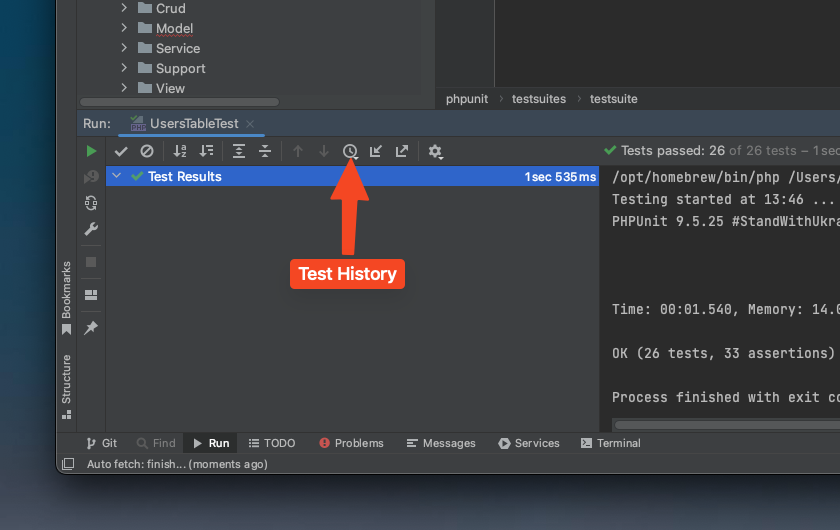
If you click it, you’ll get a dropdown of your last 10-15 test runs and you can pull up those results for quick inspection. It’s REALLY handy for seeing your test run results over time, and the menu is also filterable, so you can type “my-run-config-name” to filter the entries down to just your preferred run configuration.
Conclusion
That’s it for the tips, thanks for reading. I found these to be very helpful for me in my recent work with PHPUnit 9 in uncovering a really nasty series of bugs…hope you find them useful in your work as well. Contribute to Open Source!