Category: unit-testing

  • PHPUnit tips for debugging tests that can time travel

    I had to go nine rounds recently with a really elusive test situation where certain tests would fail downstream, but only if certain OTHER tests were enabled and running in the test suite. This also meant that these same tests, failing in every other run, would pass when run by themselves. They also (for fun I guess) would pass perfectly in the CI/CD pipeline but not on dev, but only occasionally. It felt like the tests were hopping in a TARDIS and time-traveling back and forth to pass-land and fail-land right in my terminal.

    ARRRRRRRRRRRRRGGGGGGGGGGGGGGGHHHHHHHHHHH!!!!!!!!

    Sometimes our test suites can make us feel like that. But, we love them anyways because they take care of us and keep us from shipping bad code, so we continue to tolerate them. In my particular case, though, the work was made less painful by my good fortune to have a very well-informed colleague helping me debug. He taught me three neat tricks that helped speed the process along and get us to a solution:

    Tip 1: Create custom test suites, and quarantine the bad tests in a separate suite

    This one was so simple I couldn’t believe I hadn’t thought of it, but you don’t need to have all your tests in one test suite. Create a separate suite for just the bad ones, and then examine them one by one until you find the issue.

    <!-- the whole enchilada: not helpful -->
    <testsuite name="app">
        <directory>tests/TestCase/</directory>
    </testsuite>
    
    <!-- just the bad tests, and whatever else you want -->
    <testsuite name="debug">
        <file>tests/TestCase/FailingTestClassA.php</file>
        <file>tests/TestCase/FailingTestClassB.php</file>
        <file>tests/TestCase/FailingTestClassC.php</file>
    </testsuite>

    …and then run just that suite:

    $> vendor/bin/phpunit --testsuite debug

    This is also helpful for when you know you’re going to be running the same tests over and over again (like when doing TDD) and you don’t want to run the entire app test suite each go. Careful, though, because you might not be informed when you break something downstream.

    Tip 2: Run your test suite n times to discover larger patterns that were previously hidden

    I didn’t even know PHPUnit could do this, but it makes so much sense:

    $> vendor/bin/phpunit --testsuite asdf --repeat 10

    This will run the asdf test suite 10 times. This came in SUPER handy when I was debugging tests that would pass sometimes, fail sometimes (database race conditions, yay….). By just running the test in a single pass one at a time, I was missing larger patterns that became apparent when running it 10 times, then 100, then 1000…

    Sidebar: I am blessed that my app’s test suite currently runs in 4 seconds, so that last run may have taken a little over an hour, but at least it wasn’t four weeks like some projects.

    Tip 3: Experiment with some of the other formats

    Most people just use the default PHPUnit output format and never look at any of the other pretty ones. Check out the clean looks of --testdox!!!:

    # (if your terminal supports ANSI, try it with --colors)
    Application (App\Test\TestCase\Application)
     ✔ Bootstrap loads correct plugins
     ✔ Cli bootstrap loads correct plugins
     ✔ Bootstrap loads correct plugins in debug mode
     ✔ Cli bootstrap loads correct plugins in debug mode
     ✔ Bootstrap does not halt when exceptions occur
     ✔ Bootstrap loads correct middlewares
     ✔ Bootstrap loads correct config keys
    
    # skipped tests look like this
    Skipped Class (App\Test\TestCase\Foo\SkippedController)
     ∅ My skipped test

    How extremely, extremely readable. Also, if you practice good test naming schema, the output is very human-friendly. This output also quickly highlights which areas of your test suite have tests that you haven’t implemented yet or just marked incomplete/skipped because you’re lazy because testing is very hard and I don’t wanna do it anymore because the release is due 🙂

    Bonus tip for PhpStorm users: Run History

    I was also taught this which I found delightful: in the Run tool in PhpStorm there is a clock icon on the left-side-middle of the pane called Test History (screenshot below):
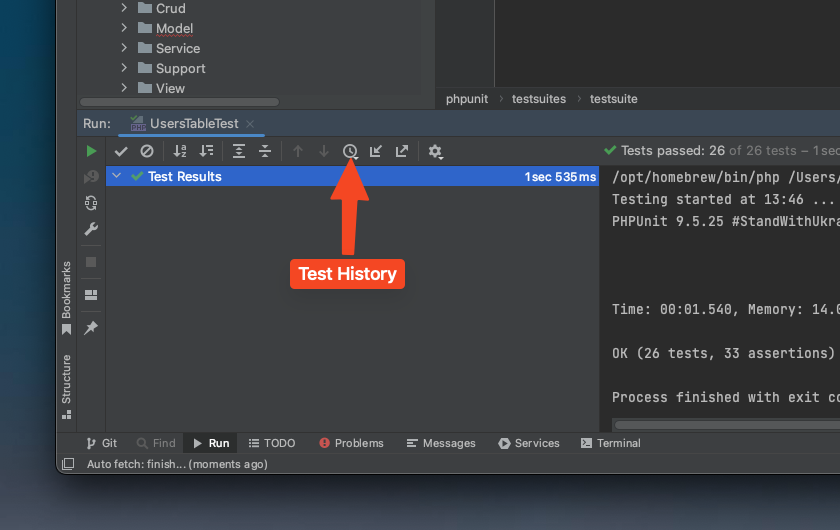
    If you click it, you’ll get a dropdown of your last 10-15 test runs and you can pull up those results for quick inspection. It’s REALLY handy for seeing your test run results over time, and the menu is also filterable, so you can type “my-run-config-name” to filter the entries down to just your preferred run configuration.

    Conclusion

    That’s it for the tips, thanks for reading. I found these to be very helpful for me in my recent work with PHPUnit 9 in uncovering a really nasty series of bugs…hope you find them useful in your work as well. Contribute to Open Source!

  • Exhaustive validation tests: is the juice worth the squeeze?

    (please forgive the title, a textbook example of Betteridge’s Law of Headlines)

    I was working on a new project recently for which one of the requirements was very high test coverage. An interesting twist though was that the data models needing validation were external to the my project’s source code. I had no control over the schema, field alignment, or any naming conventions. I had to make do with what I was given.

    The objects which required validation had classes which provided hooks for attaching one or more validation rules to each field. While custom validation rules were supported, the vast majority of rules were the validation rules built-in to the framework (CakePHP v4), such as minLength or isInteger. So I set out to writing validation tests for each field that exercised all of the validation rules attached to the model…

    …and two hours later I only had three tables done. What? That’s not very efficient, how did that happen? These tables weren’t that large, maybe 10-15 fields apiece. That’s when I remembered an adage taught to me by a (very grumpy, very high-level) mentor many years back: when you’re writing tests that take a long time to write, ask yourself: “Is the juice worth the squeeze?”

    What do you think oranges think when we squeeze them?
    Photo by Ju00c9SHOOTS on Pexels.com

    Granted, this is a bit of a hard metric to gauge by. At least it always has been for me. But in this particular situation with my tests, I think it was pretty clear I was exhausting a lot of effort for not-so-much gain. Why? Because although I thought I was testing MY tables, in fact what I was actually testing was the FRAMEWORK’S validation code. Look at this code sample (it’s for a CakePHP 4 project), ask yourself what is it really testing?

    $badEmails = [
        'abc-@mail.com',
        'abc..def@mail.com',
        '.abc@mail.com',
        'abc#def@mail.com',
        'abc.def@mail.c',
        'abc.def@mail#archive.com',
        'abc.def@mail',
        'abc.def@mail..com'
    ];
    
    foreach ($badEmails as $email) {
        $user = UserFactory::make(['email' => $email])->getEntity();
        $validate = $this->validator->validate($user->toArray());
        // $validate is a nested array of validation errors
        $this->assertNotNull(Hash::get($validate), 'email.email');
    }

    This code will apply each of these “bad” emails to the user entity and run the validation checks on it, and the built-in email validation rule will run for each email and either register an error or not (if valid). So what is the System Under Test (SUT) here? It’s it my entity, or is it the built-in validation ruleset in the underlying framework? (hint: it’s the latter)

    System under test (SUT) refers to a system that is being tested for correct operation. According to ISTQB it is the test object. From a Unit Testing perspective, the SUT represents all of the classes in a test that are not predefined pieces of code like stubs or even mocks.

    From Wikipedia, the free encyclopedia

    Where’s the benefit here? Where’s the juice for my squeeze? If I am not actually testing the SUT, then there is no juice. The juice in fact lies in the framework tests, because you know they’re already testing the crap out of these validators every release. If they weren’t, would they be a competitor in the open-source PHP web framework space? Not a chance. So why am I duplicating their efforts? Is there a way I can get juice of a different form from my model layer tests so that I don’t just have ZERO tests on them?

    Turns out there is. Check out this code (again, this is CakePHP 4 code):

    // helper_functions.php
    private function getValidationRulesForField(Validator $validator, string $fieldName): array
    {
        $fieldRules = $validator->field($fieldName)->rules();
    
        return collection($fieldRules)->map(function ($rule) {
            return $rule->get('rule');
        })->toArray();
    }
    
    // my_test.php
    $nameRules = $this->getValidationRulesForField($this->validator, 'name');
    
    $expected = [
        'scalar' => 'isScalar',
        'maxLength' => 'maxLength'
    ];
    
    $this->assertEquals($expected, $nameRules);

    This code will use a helper method (which I have conveniently stashed in a Trait in my code, but you may handle it however you wish) to assemble a list of validation rules that will be applied to the entity when it validates. Then, I just assert off that list. This allows me to confidently state the following:

    1. All of the validation rules we expect will be applied to the entity on save
    2. The validation rules will be applied in the order we expect
    3. If additional validation rules are added, our tests will fail and we know we need to update them
    4. If validation rules are removed, our tests will fail and we know we need to update them

    That’s a GOOD amount of juice from those four assertions! If you use the above code snippet for all of the fields in each of your entities, that’s a really good baseline level of code coverage for a field that has no other tests whatsoever.

    Important note: when I say “baseline”, I do mean baseline. It is more likely than not that some of your fields could use more validation than the simple test above. If that is the case, you should most definitely expend the effort to add the extra tests. Why? Because, in that case the juice would be worth the squeeze.

    With the above method, I got to a total of 72 tests across three interconnected entities in my application’s data layer (granted, this does include the couple of tests I wrote before I wrote the above code). I was able to write the bulk of these tests in about an hour of extra work, as it was largely copy / paste / update field names.

    I urge you to consider whether exhaustive validation tests are bringing you enough value to justify the time spent on them, or whether a few quick-and-dirty tests (in combination with upstream third-party tests you’re confident in) is sufficient to produce a high-quality, well-tested modern web application. Good luck!